1. Click on your company name in the upper right hand corner to access the Admin menu 
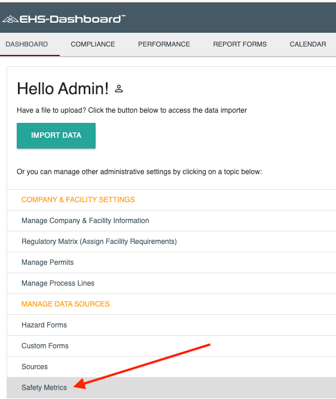
2. From the Admin Menu Under "Manage Data Sources" click "Safety Metrics":
Note: This page may take a few moments to load. Thanks for your patience.
3. In section "2. Configure Calculations", use the select menu in the box to identify the source of total labor hours to complete the calculation for Total Case Rate and DART Rate.
- 1. Employee Count x OSHA Standard (163.3)
- 2. Employee Count x Custom Factor (you provide this factor)
- 3. Total Labor Hours (input total labor hours each month)
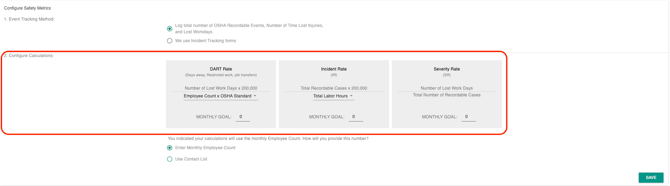
4. Also in Section 2 of the "Safety Metrics config form" you can enter an integer into the "Monthly Goal" field for "Incident Rate", "DART Rate", and "Severity Rate":
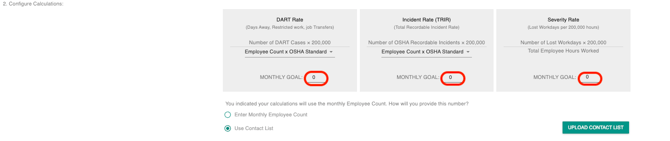
Note: Monthly employee population data must be entered for these rates to calculate correctly. Employee count can be entered manually or managed through a Contact List import.
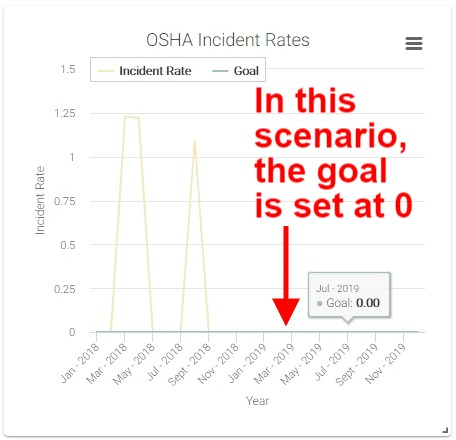
5. Once your goal is established, it will be visualized as a trend line on your annual ‘OSHA Incident Rate’ and the annual 'OSHA Lost Workday Rate’ graphs under 'Performance' and then 'Safety Metrics'.