
OPTION 4: Directly Input Monthly Totals for Employee count and Use Event Report forms to log incidents/events and conduct follow up investigations
- When to use this option: Use this configuration if employees log incident/event reports in the EHS-Dashboard™ but you will directly input a monthly total for employee count
1. Navigate to the Admin menu by clicking on the company name in the upper right hand corner

2. From the Admin menu, under "Manage Data Sources" click "Safety Metrics"
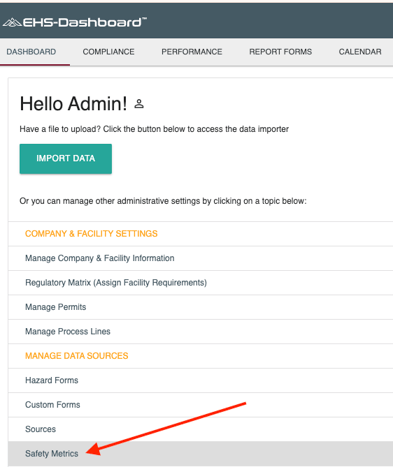
Note: This page may take a few moments to load. Thanks for your patience.
3. In section "1. Event Tracking Method", select the radio button for the option: "We use Incident Tracking forms".
Then, choose the form(s) that are used for Incident/Event Reporting from the select menu that appears to the right.

4. In section "2. Configure Calculations", use the select menu in the box to identify the source of total labor hours to complete the calculation for Total Case Rate and DART Rate.
- 1. Employee Count x OSHA Standard (163.3)
- 2. Employee Count x Custom Factor (you provide this factor)
- 3. Total Labor Hours (input total labor hours each month)
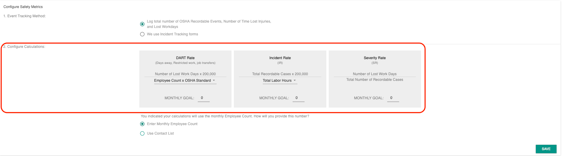
5. In section "2. Configure Calculations", select the radio button for the option: "Enter Monthly Employee Count"
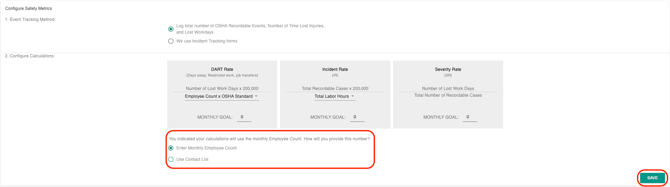
6. In section "3. Map Calculation Fields" use the select menu to identify which fields from your Incident/Event tracking forms will control the count of OSHA Recordable Incidents & Lost Workdays.

7. If you would like the system to auto-generate an OSHA 300 and 300A forms based on Incident Reports logged, continue to section "4. OSHA's Form 300" and map fields from your Incident Tracking forms to the corresponding OSHA 300 form fields on the left. Otherwise, proceed to the next step.

8. Click "Save"
Now you're ready to add data! All data from Incident forms, once logged in the system, will automatically calculate Safety Metric data. Make sure to keep Employee Count up to date so rates are accurately calculated each mont!