-
From the top right corner of the application, select your Company Name to open the Admin view.

-
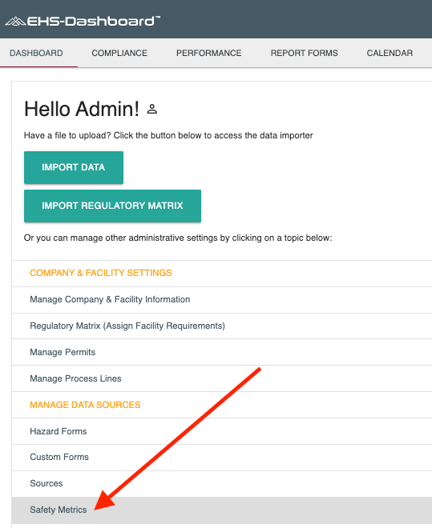
In the Admin menu, click Safety Metrics.
-
On the Safety Metrics page, locate the Monthly Employee Count section. If your organization uses the Contact List option for entering employee counts, the Upload Contact List option will be available.
Click Upload Contact List to open the Upload Contact List wizard.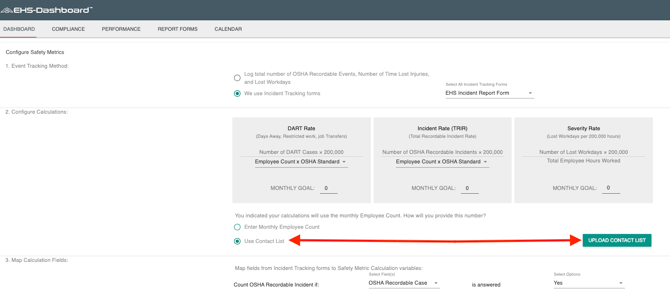 A template for the contact list upload spreadsheet can be found here.
 -
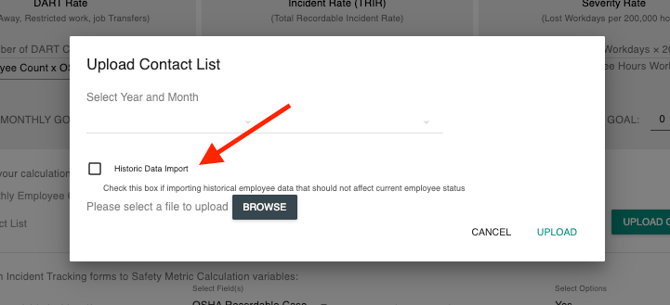
In the wizard, select the Year and Month that the contact list applies to. If you are importing past data, check the box labeled Historical Data Import.
-
Continue through the remaining steps in the wizard to upload your contact list. Once complete, the monthly contact list will be saved and applied to your employee count for the selected period!
English - United States
